
QuoteWerks Support Portal
How can we help you today?
Remote installation icon colour
2 CommentsSorted by Oldest First

Matt Rose (matt@prestigequoting.com)
said
6 months ago
I do similar.
Not sure how it would stop them ending up with two installations pointed at the same place, however.
Steve Siggs
said
6 months ago
Applying a different Tools menu -> My Preferences option -> Appearance tab -> Color Scheme and/or Document Items Background Color could also help.
(Note that applying a Color Scheme other than "(System)" can sometimes cause anomalous errors in QuoteWerks Desktop.)
David Jones
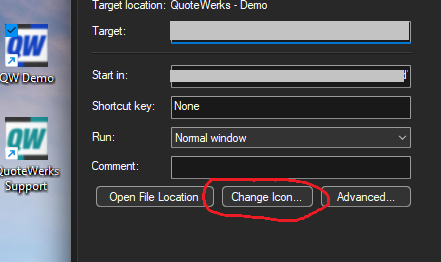
I have just had an online session with a QuoteWerks remote user who was using his Remote installation thinking that it was his Master installation. He was unsure how that happened as he has both icons on his desktop and they were both pointing to his remote installation but had been logged in using his Master installation the previous day.
My suggestion is to use a different colour icon for the Remote installation - say, exactly the same design but in a colour blue or some other distinct colour.