
QuoteWerks Support Portal
How can we help you today?
Suggestion Box
4 CommentsSorted by Oldest First
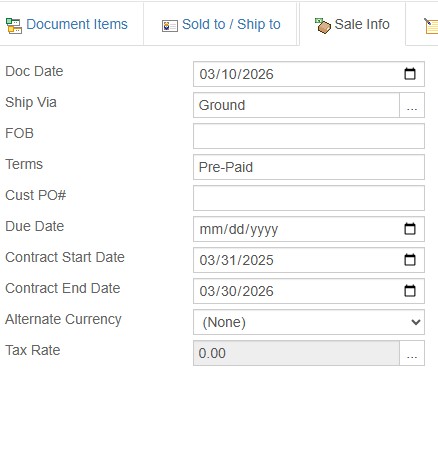
While you're doing that, might as well reset the entire Sale Info section. Contract Start Dates etc...

Matt Rose (matt@prestigequoting.com)
said
8 months ago
Agreed, would be useful, or even something within Options to define which data is reset.
This is the exact sort of thing that the scripting is made for.
You get exactly what you want, sometimes within minutes.
Steve Siggs
said
8 months ago
We've got a couple of scripts that we use in-house that do exactly this type of thing... email steve(at)hilltopsit.co.uk if you'd like copies
Jack Weibezahl
said
6 months ago
Hi Larry,
QuoteWerks Web features a powerful built-in Scripting Manager that includes an AI Assistant. This means you do not need to be a programmer to build custom automations! You can talk to the AI Assistant exactly like a human—simply describe what you want the script to do in plain English, and the system will automatically translate your prompt into the exact JavaScript code required.
To clear fields out during a duplication, we will use the
AfterNewDocument event hook, which allows the script to detect when a document is created specifically via duplication.Step-by-Step Instructions
Here is exactly how to use the AI Assistant to generate and apply your script:
- Navigate to the left-hand navigation bar in QuoteWerks Web and select Scripting Manager.
- In the Event Hooks list, locate and click on the AfterNewDocument event to open the code editor for this specific trigger.
- Click on the brain icon on the toolbar to open the AI Assistant.
- In the prompt box, type your request just like you are talking to a human. For this specific workflow, you can copy and paste this exact prompt: "If the document is created via duplication, clear out the SoldToPONumber, ContractStartDate, and ContractEndDate document header fields."
- Click the AI Generate Script button. You will see the AI translate your instructions and insert the correct JavaScript into the editor.
- Keep in mind that saving changes in the Scripting Manager will immediately make the script active for your environment. When you are ready, click the Save icon on the toolbar to commit your new script.
- Ensure the toggle switch next to the
AfterNewDocumentevent in your Event Hooks list is turned on.
If there are any other fields on the Sale Info tab you want to clear, you can simply add their backend field names to your prompt! For example, you can tell the AI to also clear the
Terms, FOB, or CustomText25 fields.
Miller, Larry
When duplicating it would be great if you could remove/clear the Cust PO# field.